
How to Use Meta for Marketing: Introduction
What Is Meta Marketing?
Meta marketing refers to using Meta’s platforms and advertising tools to promote a business, product, service, or brand.
The main platforms include:
- Meta Ads Manager
- Meta Business tools
- Meta Pixel
- Conversions API
- Meta audience and targeting tools
For businesses, Meta can be used for both organic marketing and paid advertising.
Organic marketing includes:
- Instagram posts
- Instagram Reels
- Stories
- Facebook posts
- Community engagement
- Educational content
- User-generated content
Paid marketing includes:
- Facebook Ads
- Instagram Ads
- Lead generation campaigns
- Website conversion campaigns
- Traffic campaigns
- Sales campaigns
- Retargeting campaigns
The biggest advantage is that businesses can use audience data and campaign performance information to make more informed marketing decisions.
Why Use Meta for Marketing in India?
India has a huge social media audience, making Facebook and Instagram important platforms for businesses.
Whether you are running an e-commerce store, local business, coaching business, agency, personal brand, or startup, Meta can help you reach potential customers.
Some major reasons businesses use Meta for marketing include:
1. Large Audience
Facebook and Instagram provide access to a large number of potential customers.
2. Detailed Targeting
Businesses can target audiences based on factors such as:
- Age
- Location
- Interests
- Demographics
- Online behaviour
- Previous interactions
- Website activity
3. Flexible Budgets
You can start with a relatively small daily budget and increase spending when you find campaigns that perform well.
4. Multiple Advertising Formats
You can advertise using:
- Images
- Videos
- Reels
- Stories
- Carousels
- Collection formats
5. Measurable Results
Meta Ads Manager provides performance information such as:
- Reach
- Impressions
- Clicks
- Cost per click
- Leads
- Purchases
- Conversion rate
- Return on ad spend
How to Set Up Meta for Marketing
Before running advertisements, you need to create the basic Meta business setup.
The process generally involves:
- Create a Meta account.
- Create a Facebook Page.
- Create or connect an Instagram professional account.
- Set up Meta Business tools.
- Create an advertising account.
- Add your payment method.
- Install tracking.
- Define your marketing objective.
- Create your first campaign.
Once these steps are complete, you can start building your Meta Ads strategy.
Step 1: Create a Meta Business Account
The first step in learning how to use Meta for marketing is setting up your business assets.
A business setup allows you to manage different marketing assets from one place.
Depending on your business requirements, you may need:
- Facebook Page
- Instagram account
- Ad account
- Pixel
- Dataset
- Product catalogue
- Business portfolio
- Payment method
Keep your business information accurate and consistent.
This makes it easier to manage your campaigns as your business grows.
Step 2: Connect Facebook and Instagram
Connecting Facebook and Instagram allows you to manage your social media marketing activities more efficiently.
For example, you can use the same advertising system to create campaigns across Facebook and Instagram.
This is particularly useful for businesses doing Instagram marketing for business.
Before advertising, make sure:
- Your Facebook Page is complete.
- Your Instagram account is professional.
- Your business information is accurate.
- Your website is working.
- Your contact information is updated.
- Your branding is consistent.
A properly prepared profile can also improve the experience for people who click your advertisement.
Step 3: Create a Meta Ad Account
Your advertising account is where you create and manage your paid campaigns.
Inside Meta Ads Manager, you can control:
- Campaigns
- Ad sets
- Ads
- Budgets
- Audiences
- Placements
- Tracking
- Performance data
The basic structure looks like this:
Campaign → Ad Set → Ad
Campaign
The campaign defines your overall marketing objective.
Ad Set
The ad set controls things such as:
- Audience
- Budget
- Schedule
- Placements
Ad
The advertisement contains your:
- Image or video
- Primary text
- Headline
- Call-to-action
Understanding this structure is essential for anyone learning how to use Meta for marketing.
Step 4: Install Meta Pixel
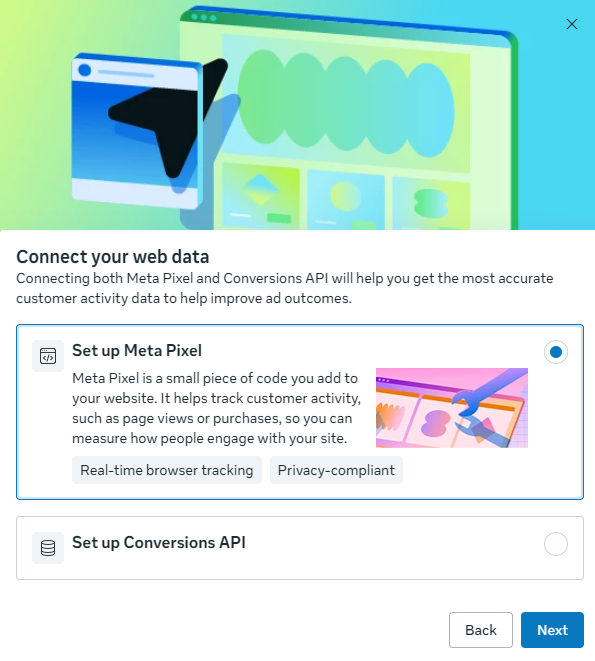
The Meta Pixel is a tracking tool that can help businesses understand actions people take on their website after interacting with Meta advertising.
For example, you may want to measure:
- Page views
- Product views
- Add to cart
- Checkout
- Purchases
- Leads
Tracking allows you to understand whether your advertising is producing useful business results.
It can also help with audience creation and campaign optimization.
Step 5: Understand Conversions API
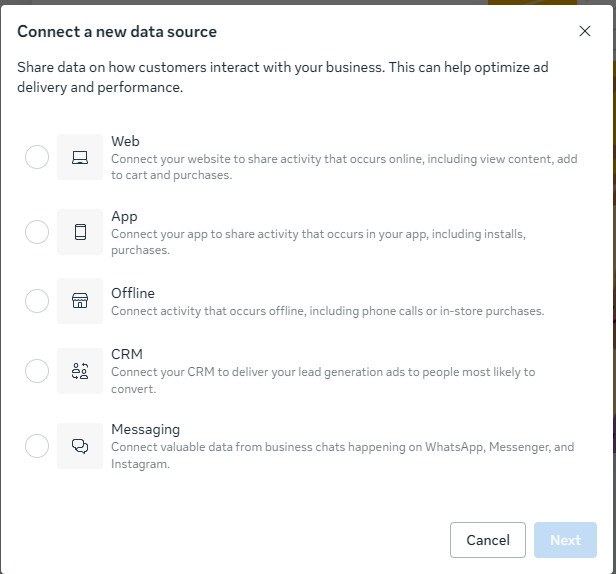
Conversions API (CAPI) is another important part of modern Meta advertising.
It allows businesses to send certain customer activity data from their server or other supported sources to Meta.
Using Pixel and Conversions API together can provide a more reliable measurement setup than relying on browser-side tracking alone.
For businesses spending significant money on Meta Ads, understanding tracking is extremely important.
Step 6: Choose Your Marketing Objective
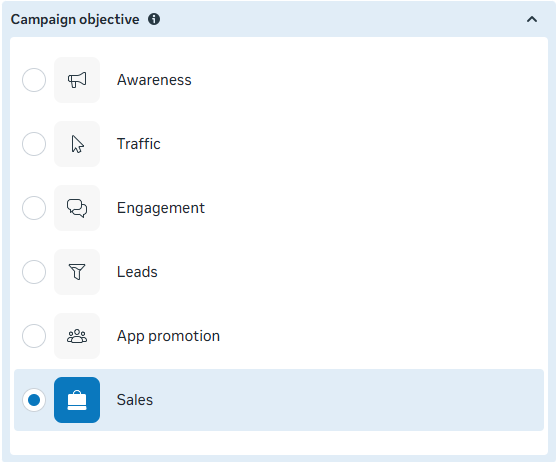
One of the most important decisions when creating a campaign is choosing the correct objective.
Your objective should match your actual business goal.
For example:
Awareness
Useful when your goal is to introduce your business or brand to more people.
Traffic
Useful when you want people to visit a website or destination.
Engagement
Useful when your goal involves interactions with your content.
Leads
Useful when you want potential customers to submit their information.
Sales
Useful when your main goal is to generate purchases or other conversions.
The objective should always connect to the final business outcome you want.
Understanding the Meta Marketing Funnel
A strong Meta Ads strategy usually considers the complete customer journey.
A simple funnel can be divided into three stages.
1. Awareness
At this stage, people may not know your business.
You can use:
- Reels
- Video ads
- Educational content
- Brand storytelling
- Awareness campaigns
The goal is to introduce your business.
2. Consideration
People already know about your business but may not be ready to purchase.
You can use:
- Product demonstrations
- Testimonials
- Educational content
- Comparison content
- Lead generation
3. Conversion
These people are closer to taking action.
You can use:
- Sales campaigns
- Offers
- Product ads
- Retargeting
- Cart recovery campaigns
Thinking about the funnel helps you avoid showing the same message to every person.
How to Create a Meta Ads Campaign
Once your account and tracking are ready, you can create a campaign.
A basic process looks like this:
Step 1: Open Ads Manager
Go to your Meta advertising dashboard.
Step 2: Create Campaign
Select your campaign objective.
Step 3: Set Up Your Ad Set
Choose:
- Audience
- Budget
- Schedule
- Placements
Step 4: Create Your Advertisement
Add:
- Creative
- Primary text
- Headline
- Call-to-action
- Destination URL
Step 5: Review
Check your:
- Tracking
- Links
- Budget
- Audience
- Creative
- Copy
Step 6: Publish
Submit the campaign for review.
After approval, Meta can begin delivering your ads according to the campaign settings.
How Much Should You Spend on Meta Ads?
There is no single budget that works for every business.
Your budget depends on:
- Business model
- Product price
- Customer value
- Competition
- Location
- Campaign objective
- Conversion rate
- Audience size
For a beginner, starting with a controlled test budget can be better than immediately spending a large amount.
For example, you might start with a small daily budget, collect enough data, identify the strongest creative and audience combinations, and then gradually increase spending.
The goal is not simply to spend more.
The goal is to understand what produces profitable results.
How to Target the Right Audience on Meta

Audience targeting is one of the most important parts of Meta for marketing.
Your audience can be defined using factors such as:
Location
Target:
- Country
- State
- City
- Specific areas
Age
Choose the age range that makes sense for your product or service.
Gender
Use gender targeting only when it is genuinely relevant to your offer.
Interests
Depending on the available targeting options, interests can help you reach people who may be relevant to your business.
Custom Audiences
You can create audiences based on interactions or customer information where supported and appropriately collected.
Lookalike Audiences
Lookalike audiences can help you reach people who resemble an existing audience.
Broad vs Detailed Targeting
One common mistake is making audiences unnecessarily narrow.
For example, a marketer may add too many interests and restrictions because they believe a smaller audience will automatically produce better results.
That is not always true.
Depending on the campaign and available Meta delivery systems, broader audiences can sometimes give the platform more opportunities to find people likely to take the desired action.
Test different audience approaches rather than assuming one method always works.
Choosing Meta Ad Placements
Meta can display advertising across different placements and surfaces.
Depending on your campaign setup, placements may include:
- Facebook Feed
- Instagram Feed
- Instagram Stories
- Instagram Reels
- Facebook Stories
- Other supported Meta placements
The best placement depends on your creative and campaign objective.
For example, vertical video content is naturally suited to placements such as Reels and Stories.
Always check how your creative appears across different placements before launching.
How to Create High-Converting Meta Ads
Your advertisement needs to stop the user from scrolling.
A good ad normally contains three important elements:
1. Hook
The first few seconds or first line should create interest.
Example:
“Still spending money on ads without knowing where your customers come from?”
2. Value
Explain what the customer gets.
For example:
- Save time
- Increase leads
- Improve visibility
- Solve a problem
- Get a better experience
3. Call-to-Action
Tell the user what to do next.
Examples:
- Learn More
- Shop Now
- Sign Up
- Get Quote
- Book Now
- Contact Us
Meta Ad Creative Strategy
Creative quality can have a major impact on advertising performance.
Test different formats such as:
Static Images
Useful for simple offers and product-focused advertising.
Short Videos
Useful for demonstrating products, explaining services, or telling stories.
Reels
Useful for vertical short-form content.
Carousel Ads
Useful when you want to show multiple products, features, steps, or benefits.
User-Generated Content
Customer-style content can make advertisements feel more natural and relatable.
The key is not to create one advertisement and stop.
Create multiple variations and compare performance.
How to Write Better Meta Ad Copy
A simple structure for ad copy is:
Problem → Solution → Benefit → CTA
Example:
Problem: “Not getting enough leads from your website?”
Solution: “We help businesses build targeted Meta advertising campaigns.”
Benefit: “Reach relevant audiences and turn clicks into measurable leads.”
CTA: “Get Started Today.”
Keep your copy clear.
Avoid filling the advertisement with unnecessary words.
Meta Marketing: Keywords vs SEO
Meta advertising and SEO are different marketing channels.
SEO focuses on improving visibility in search engines.
Meta advertising focuses on reaching audiences through Meta platforms.
For example:
Someone searching Google for:
“best digital marketing agency in Delhi”
has a different intent from someone scrolling Instagram and seeing a digital marketing advertisement.
A strong digital marketing strategy can combine both channels.
You can use:
- SEO
- Google Ads
- Meta Ads
- Content marketing
- Email marketing
- Social media marketing
Instead of depending on one traffic source, businesses can create multiple acquisition channels.
How to Test Meta Ads
Testing is one of the most important parts of Meta marketing.
You can test:
- Headlines
- Primary text
- Images
- Videos
- Hooks
- CTAs
- Landing pages
- Audiences
- Offers
For example:
Ad A
Video + educational message
Ad B
Video + customer testimonial
Ad C
Static image + promotional offer
After collecting enough data, compare the results.
Do not make major decisions based on extremely small amounts of data.
Important Meta Ads Metrics
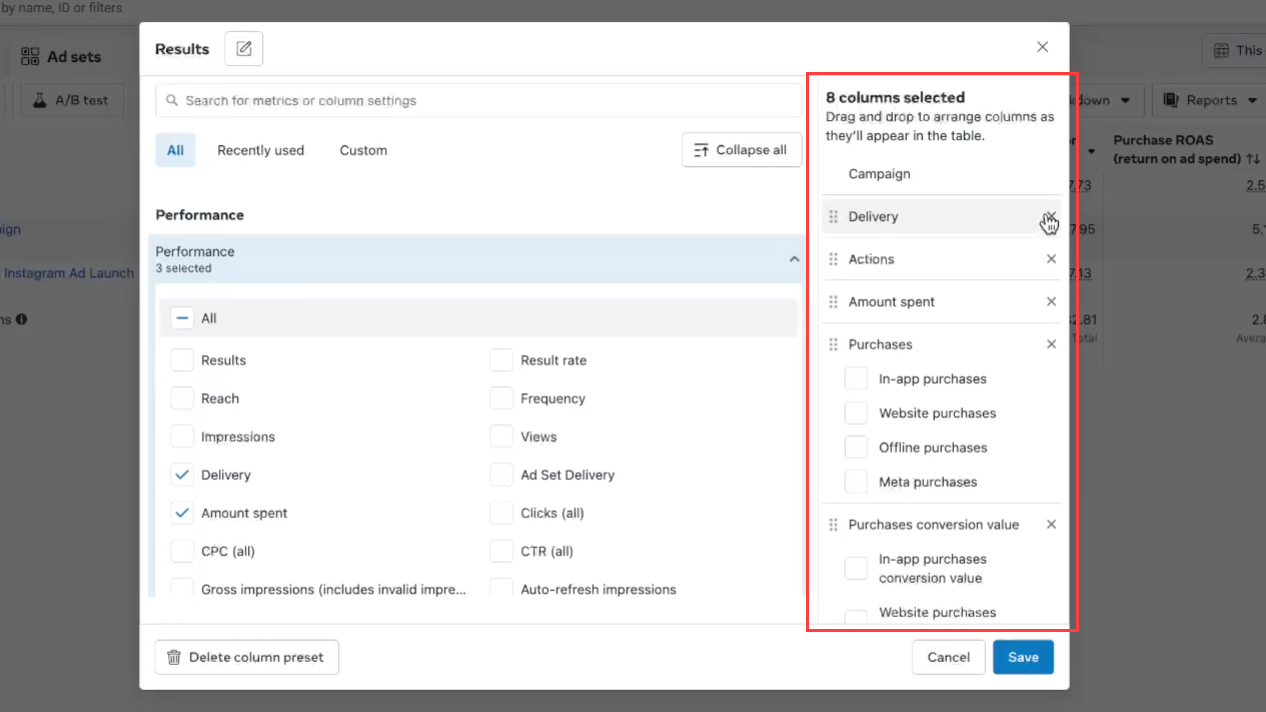
To understand whether your campaign is working, you need to monitor the right metrics.
Reach
The number of people who saw your content or advertisement.
Impressions
The number of times your advertisement was displayed.
CTR
Click-Through Rate measures how often people clicked after seeing an advertisement.
CPC
Cost Per Click tells you approximately how much each click costs.
CPM
Cost Per Thousand Impressions measures the cost of generating a thousand impressions.
Conversion Rate
The percentage of users who completed the desired action.
Cost Per Lead
The average amount spent to generate a lead.
ROAS
Return on Ad Spend compares the revenue generated with advertising expenditure.
For e-commerce businesses, ROAS can be particularly useful when revenue tracking is properly configured.
Understanding the Meta Learning Phase
New campaigns and significant changes can require time for Meta’s delivery system to gather information and optimize.
Constantly editing campaigns can make analysis more difficult.
Instead:
- Define your objective.
- Launch the campaign.
- Allow sufficient time for data collection.
- Monitor performance.
- Identify problems.
- Make controlled changes.
- Continue testing.
Avoid making large changes every few hours simply because you have not seen immediate results.
How to Optimize Meta Ads
Optimization means improving your campaign based on actual performance data.
Look for patterns.
For example:
If one creative generates significantly better results than others, consider producing more variations based on that concept.
If clicks are strong but conversions are weak, investigate:
- Landing page
- Offer
- Website speed
- Product information
- Checkout process
- Tracking
If impressions are high but engagement is weak, consider testing a different:
- Hook
- Creative
- Message
- Offer
Optimization should focus on finding the actual reason behind poor performance.
Retargeting With Meta
Not every person converts the first time they see your brand.
Someone might:
- Visit your website.
- View a product.
- Leave without purchasing.
Retargeting can help you reach eligible people who have previously interacted with your business.
You can build audiences based on supported activities such as:
- Website visitors
- Product viewers
- Customer lists
- Instagram interactions
- Facebook interactions
- Video engagement
The message can then be different from your cold-audience advertising.
For example:
Cold audience: “Discover our new collection.”
Retargeting audience: “Still thinking about it? Take another look at the products you viewed.”
Meta Marketing for E-Commerce Businesses
E-commerce businesses can use Meta advertising throughout the customer journey.
A basic strategy can include:
Top of Funnel
Use videos and engaging creatives to introduce products.
Middle of Funnel
Show product benefits, reviews, demonstrations, and educational content.
Bottom of Funnel
Retarget people who have already interacted with products or the website.
You can also use catalog-based advertising where appropriate.
Meta Marketing for Local Businesses in India
Local businesses can also use Facebook Ads India and Instagram advertising to reach people in specific areas.
Examples include:
- Restaurants
- Gyms
- Salons
- Clinics
- Coaching centres
- Real estate businesses
- Local service providers
For local businesses, location can be an important targeting factor.
Your advertisement should clearly communicate:
- Location
- Service
- Main benefit
- Offer
- Contact method
For example:
“Looking for a gym in Noida? Start your fitness journey with flexible membership plans.”
Meta Marketing for Personal Brands
Creators, freelancers, consultants, coaches, and professionals can also use Meta for marketing.
Content ideas include:
- Educational videos
- Industry tips
- Case studies
- Behind-the-scenes content
- Client results
- Personal experiences
- Tutorials
- FAQs
A personal brand should focus on building trust instead of continuously selling.
The more useful your content is, the easier it can become for people to understand your expertise.
Instagram Marketing for Business
Instagram can be particularly useful for visually driven brands.
A basic Instagram marketing for business strategy can include:
Reels
Create short educational, entertaining, or product-focused videos.
Stories
Use Stories for:
- Updates
- Polls
- Questions
- Offers
- Behind-the-scenes content
Carousels
Use multiple slides to explain:
- Tips
- Mistakes
- Processes
- Case studies
- Educational topics
Social Proof
Show:
- Reviews
- Testimonials
- Customer experiences
- Results
Consistency is usually more important than trying to create a perfect post every day.
Common Meta Marketing Mistakes
Avoid these common mistakes when starting Meta advertising.
1. Targeting Everyone
Your campaign needs a clear customer profile.
2. Using One Creative
One advertisement does not give you enough information about what works.
3. Changing Campaigns Too Often
Constant changes make performance harder to evaluate.
4. Ignoring Tracking
Without reliable measurement, it becomes difficult to understand results.
5. Focusing Only on Likes
Likes do not automatically equal business success.
Focus on metrics connected to your objective.
6. Sending Traffic to a Poor Landing Page
Even a good advertisement cannot fix a confusing or slow website.
7. Ignoring Mobile Users
Most social media activity happens on mobile devices, so your website and creatives should work well on mobile.
Meta Marketing Tips for India
If you are targeting Indian customers, consider:
1. Regional Languages
Depending on your audience, test content in languages such as:
- Hindi
- English
- Hinglish
- Bengali
- Marathi
- Tamil
- Telugu
2. Local Creatives
Use locations, cultural references, and situations that your target customers understand.
3. Mobile-First Content
Make sure your website, landing pages, videos, and forms work well on smartphones.
4. Different Price Points
Customer purchasing behaviour can vary significantly across different markets and audience segments.
5. Test Before Scaling
Start with controlled testing and scale campaigns based on performance.
Beginner Meta Ads Strategy
If you are completely new to Meta advertising, follow this simple process.
Step 1
Define your customer.
Step 2
Define your business goal.
Step 3
Set up Meta Business tools.
Step 4
Install tracking where appropriate.
Step 5
Create multiple creative concepts.
Step 6
Launch a controlled campaign.
Step 7
Monitor important metrics.
Step 8
Identify the strongest performers.
Step 9
Test new variations.
Step 10
Scale carefully when results are consistent.
This is a much better approach than randomly boosting posts and hoping for sales.
How Long Does Meta Advertising Take to Work?
There is no fixed number of days required for every campaign.
Results depend on:
- Objective
- Budget
- Audience
- Product
- Creative
- Competition
- Landing page
- Offer
- Tracking
- Conversion process
Some campaigns may generate results quickly, while others need more testing.
The important thing is to collect meaningful data and optimize based on actual performance.
Can You Use Meta Marketing Without a Website?
Yes.
Businesses can use Meta for marketing even without a traditional website.
Depending on the campaign and business model, you may use:
- Instagram profile
- Facebook Page
- Lead forms
- Messenger
- Direct messages
However, having a professional website can provide additional opportunities for:
- SEO
- Conversion tracking
- Remarketing
- Content marketing
- Customer education
- Direct sales
Meta Marketing for Freelancers
If you are a freelancer learning how to use Meta for marketing, focus on developing practical skills rather than only collecting certificates.
Learn:
- Meta Ads Manager
- Audience research
- Creative strategy
- Copywriting
- Tracking
- Pixel
- Conversions API
- Campaign optimization
- Reporting
- Landing pages
Build your own test projects or case studies.
A portfolio showing what you did, why you did it, and what happened can be more useful than simply saying that you know Meta Ads.
Frequently Asked Questions About How to Use Meta for Marketing
What is Meta marketing?
Meta marketing means using platforms and tools such as Facebook, Instagram, Meta Ads Manager, and related advertising technologies to promote a business, product, service, or personal brand.
How do I start using Meta for marketing?
Start by creating your Facebook Page and Instagram professional account, setting up your Meta business assets and ad account, installing appropriate tracking, defining your objective, creating your audience and creatives, and launching a controlled campaign.
Is Meta Ads free?
Creating and managing an advertising account does not mean your advertisements are free. Paid campaigns require an advertising budget. Organic Facebook and Instagram marketing can be done without paying for ad delivery.
How much should a beginner spend on Meta Ads?
There is no universal amount. Start with a controlled test budget that your business can afford, collect data, and increase spending only when your campaign demonstrates sustainable performance.
Is Meta Ads better than Google Ads?
Neither platform is automatically better for every business.
Meta can be strong for audience discovery, visual advertising, social engagement, and demand generation.
Google Ads can be strong when people are actively searching for a product or service.
Many businesses can benefit from using both.
What is Meta Pixel?
Meta Pixel is a website tracking technology that helps businesses measure certain website actions and support advertising measurement and optimization.
What is Conversions API?
Conversions API is a system that allows businesses to send certain customer activity data to Meta through supported server-side or other integrations.
What is retargeting in Meta Ads?
Retargeting means showing advertisements to eligible people who have previously interacted with your business, website, content, or products.
Can small businesses use Meta Ads?
Yes. Small businesses can use Meta advertising to reach specific audiences, generate leads, promote products, and build awareness.
Is Instagram marketing useful for businesses?
Yes. Instagram can be useful for businesses that want to build visibility, engage audiences, showcase products, publish short-form content, and generate leads or sales.
Final Thoughts: How to Use Meta for Marketing Successfully
Learning how to use Meta for marketing is not simply about pressing the “Create Ad” button.
Successful Meta marketing combines:
- Strategy
- Audience research
- Creative testing
- Copywriting
- Tracking
- Budget management
- Data analysis
- Optimization
- Retargeting
Start small.
Test different audiences and creatives.
Measure meaningful business results.
Learn from the data.
Then scale what works.
Whether you are a beginner, freelancer, startup, local business, e-commerce brand, or established company, Meta can become an important part of your digital marketing strategy when it is used with a clear objective and a proper measurement system.
The goal is not to run more ads. The goal is to run better marketing.
Related Digital Marketing Resources
If you are learning digital marketing, you may also want to explore:
- Google Ads
- SEO
- Google Analytics 4
- Google Tag Manager
- Google Search Console
- Keyword Research
- Content Marketing
- Social Media Marketing
- Conversion Rate Optimization
- Performance Marketing
SEO Publishing Checklist
Before publishing this article, make sure you also complete the following:
On-Page SEO
- Use the primary keyword in the SEO title.
- Use the primary keyword naturally in the H1.
- Include the primary keyword in the introduction.
- Use secondary keywords naturally throughout the article.
- Create a short, readable URL.
- Add a meta description.
- Use descriptive H2 and H3 headings.
- Add a table of contents.
- Add internal links to relevant pages.
- Add authoritative external links where appropriate.
Images
Add original screenshots or visuals such as:
- Meta Ads Manager
- Meta Business setup
- Campaign structure
- Audience settings
- Meta Pixel
- Conversions API
- Ads reporting
- Instagram advertising examples
Use descriptive ALT text.
Examples:
ALT: Meta Ads Manager campaign setup
ALT: Meta Ads audience targeting options
ALT: Meta Pixel setup for website tracking
Technical SEO
Make sure your page has:
- Mobile-friendly design
- Fast loading speed
- HTTPS
- Clean URL
- Proper heading hierarchy
- Compressed images
- Descriptive image ALT text
- Canonical URL
- XML sitemap
- Indexable content
Schema
Where appropriate, consider:
- Article schema
- FAQ schema
- Breadcrumb schema
Only use structured data that accurately represents the visible content on the page.